Improve the ordering route
Explore a clearer queue and collection area in front of the service counter without blocking access to the seating or toilets.
Generate this variation →Restaurant template
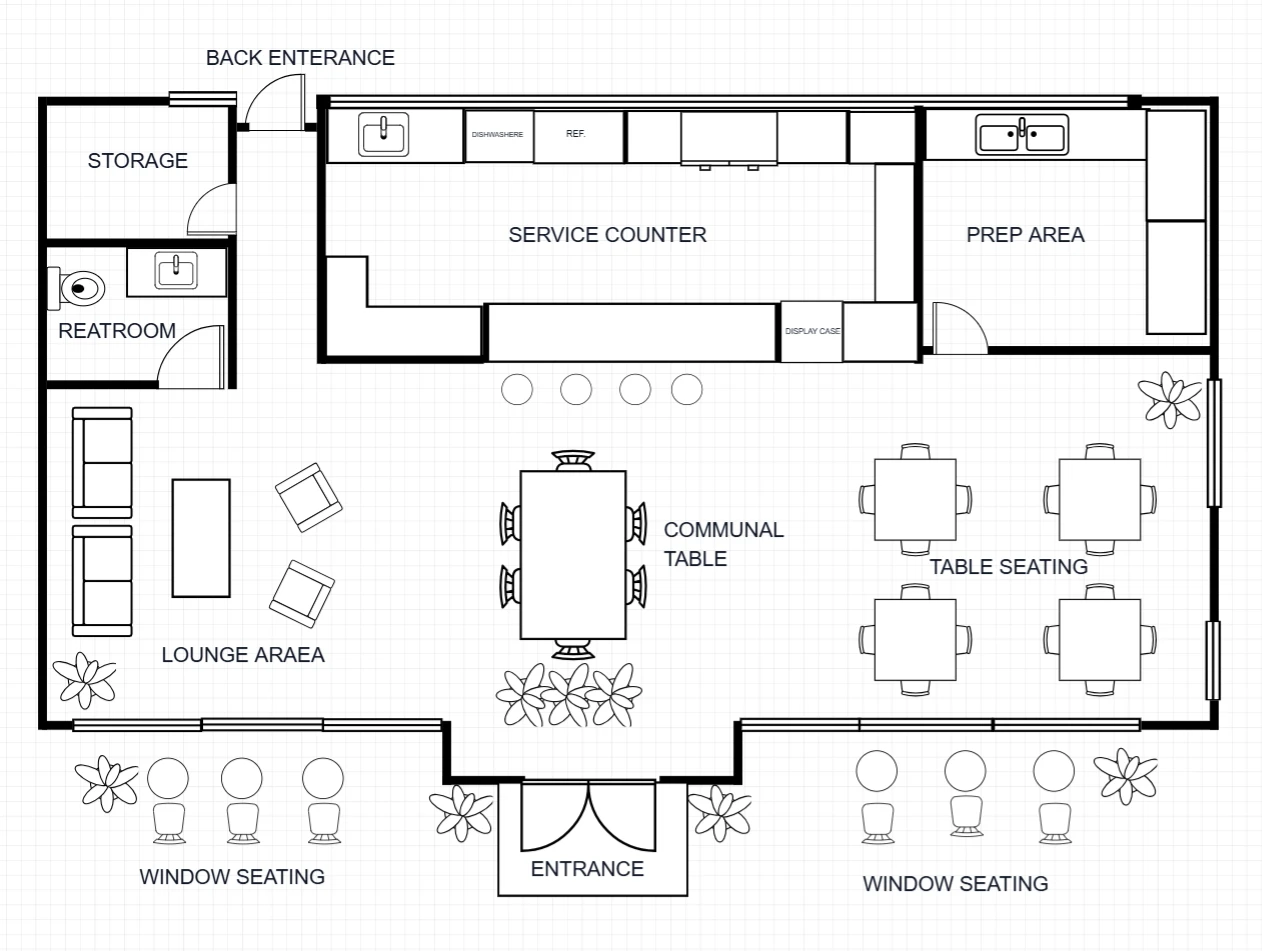
Explore a café organized around a central service counter, with perimeter seating, a preparation room and storage at the back.
Describe your changes and get a new image.
Open a personal copy with editable walls, rooms, openings and furnishings.
Best suited to
Café owners comparing the relationship between ordering, seating and back-of-house work.
Understand the plan
Look beyond the room count: check how you would move, work and spend time in this layout.
Small tables, window-side stools and a lounge corner provide different seating options.
A central counter separates customer-facing service from preparation.
An enclosed room behind the counter supports food and drink preparation.
Back-of-house storage occupies the rear-right area.
Two toilet rooms share a side access area.
The bar counter faces the main hall, creating a clear focal point for service.
Window-side stools, small tables and a lounge corner offer different ways to use the customer area.
A preparation room and storage room sit behind the counter, with toilets along the right-hand side.
The reference is a layout concept. Confirm dimensions against your own space before detailed planning.
What opens in the editor
The prepared model includes the room structure, openings, furniture and fixtures shown in the preview. Each object can be selected and edited in your own copy.
Reference-aligned layout with individually editable furnishings and fixtures. Furniture uses schematic plan symbols and matching catalog models; scale remains approximate.
Open the editable layout →Decide before you start
The central counter is easy to see from the front entrance and most seating areas.
An ordering queue can compete with routes to tables and toilets. Test those routes before adding seats.
Confirm equipment dimensions, customer capacity and measured circulation space for your actual premises.
Make it fit your brief
Try a visual direction with image generation, or change the prepared structure directly in the editor.
Explore a clearer queue and collection area in front of the service counter without blocking access to the seating or toilets.
Generate this variation →Explore more small tables and fewer counter stools, preserving the preparation and storage rooms.
Generate this variation →Want direct control over the layout? Open the prepared structure and select a wall, room or opening to edit. Your changes are saved to your own project.
Edit this layout →Use the reference to compare seating arrangements. Final capacity depends on your measured space, furniture and circulation; a verified seat count is not supplied with this template.
Generate from this image creates a new picture based on your instructions. Edit this layout opens a copy of the prepared model so you can change individual walls, rooms, openings and furnishings. A generated picture does not automatically update the model.
No. Image generation creates new results, and structural editing creates a personal project. You can return to the template to start another version.
Download generated results as images. From an editable project, export supported image, PDF, DXF or 3D formats. Check the model’s scale before using measured exports.
 Generate image · Edit layout
 Restaurant
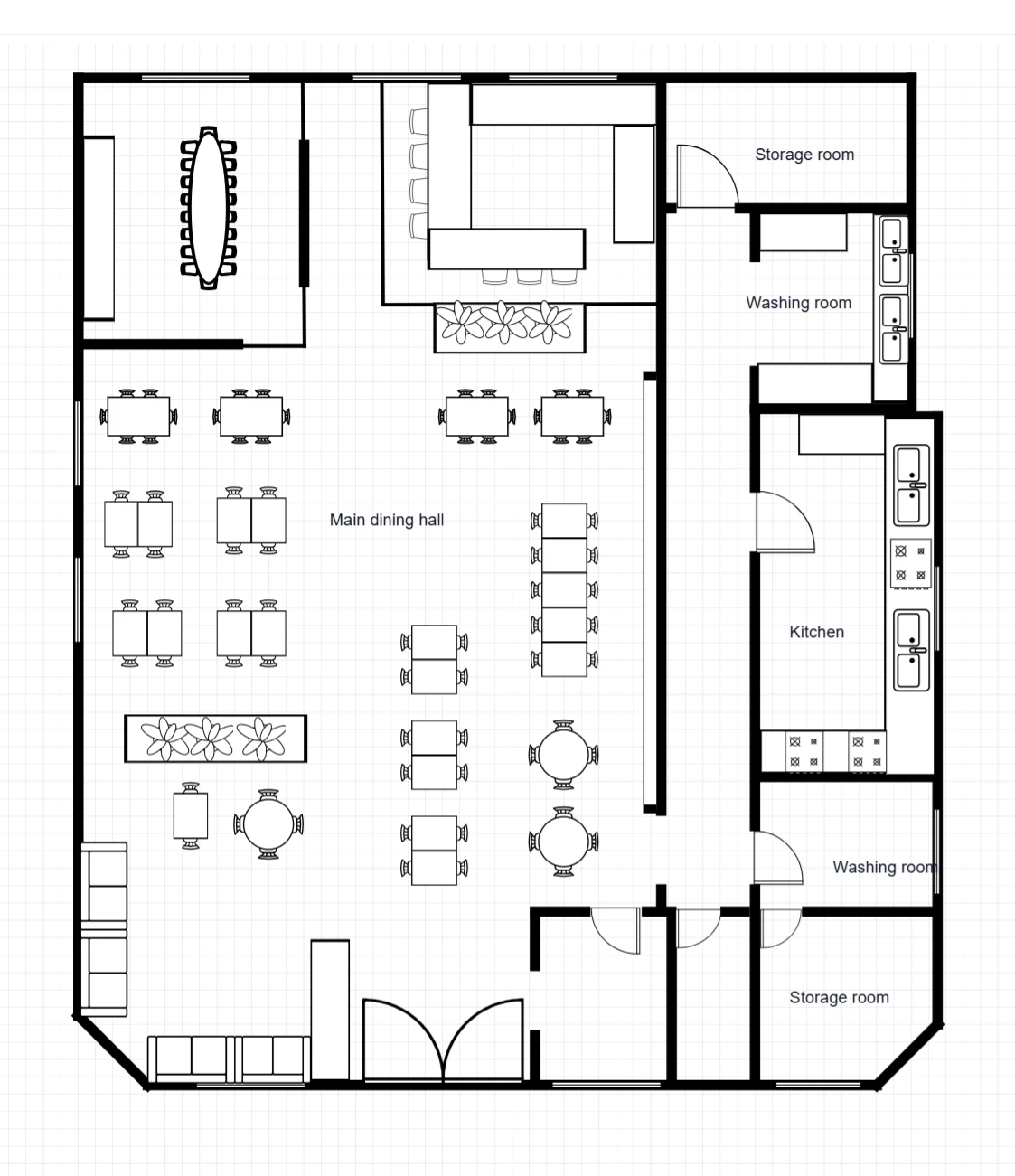
A restaurant with a large dining hall, a bar near the rear, a separate long-table room and service spaces along the right-hand side.
 Generate image · Edit layout
 Restaurant
A coffee shop with a long rear service counter, separate preparation room, communal table, lounge seating and smaller customer tables.